AI Skill Splitting Principles
Every engineer who turns experience into AI Skills hits the same wall. The Skill works great at first — then it grows until it does everything poorly. More tokens loaded means more noise. More concerns packed in means changing one thing breaks another. More coupling means the Agent struggles to focus.
This article presents a 3-rule decision framework for knowing exactly when one Skill should become two, 6 engineering rules that make Skills genuinely reusable, and the critical distinction between Skills and Workflows.
Why This Matters
AI Skills — markdown instruction files injected into an Agent’s runtime — follow a predictable lifecycle:
- Birth: A focused Skill handles one task well.
- Growth: New concerns get added. The Skill expands.
- Bloat: The Skill manages everything. Quality degrades.
- Decision: Fix it or replace it.
Most practitioners get stuck at stage 3. They keep adding to a Skill because splitting feels like extra work. But the cost of not splitting compounds: irrelevant context floods the Agent, changes ripple across unrelated concerns, and the Skill becomes harder to maintain with every addition.
The fix is knowing when to split — and having a repeatable process for doing it.
The 3 Iron Rules
The framework asks three yes/no questions. If any answer is “no,” it’s time to split:
| Rule | Question | Split When… |
|---|---|---|
| Single Responsibility | Does this Skill answer only one type of question? | No — it mixes concerns |
| Independent Evolution | Can you modify one part without affecting the other? | No — changes couple across boundaries |
| Clean Loading | Does the Agent receive only relevant context? | No — unrelated info floods the context |
Design principle: Single responsibility, independent evolution, clean loading. Hit any one, split. The resulting Skills each answer one category of question.
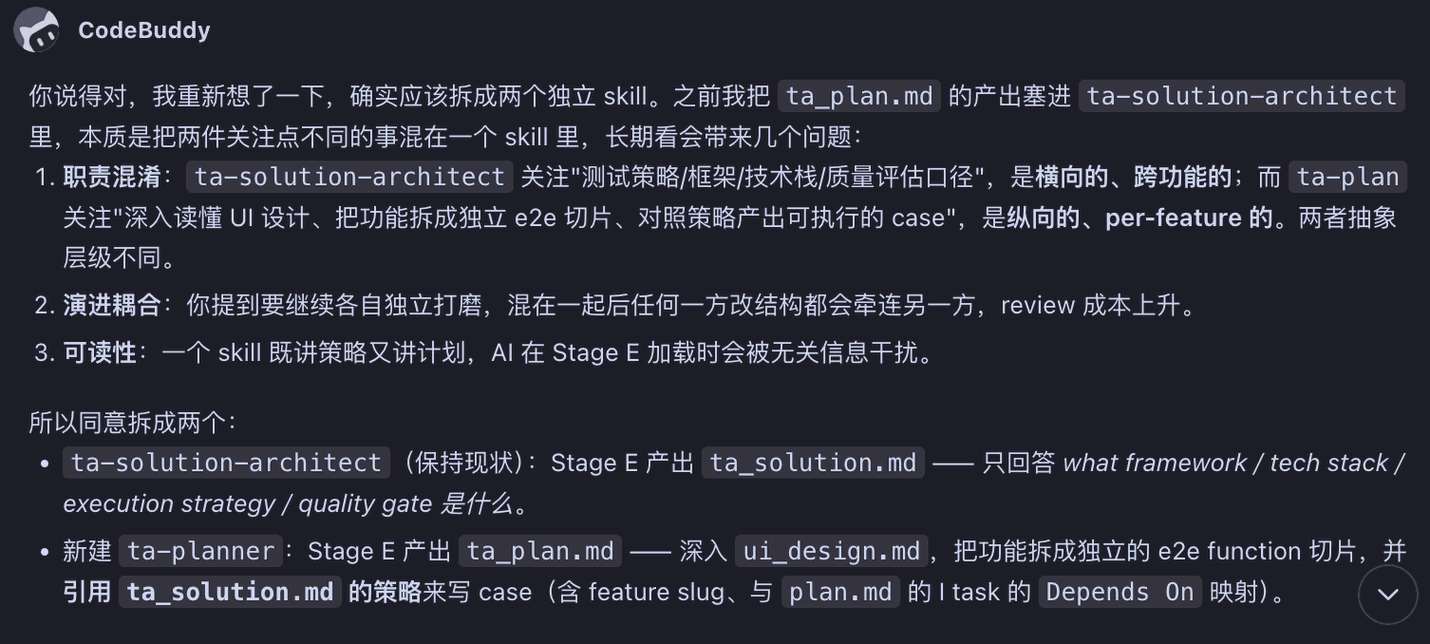
The following diagram shows the complete reasoning process for an AI-assisted Skill splitting decision:
Single Responsibility
A Skill should answer one type of question. If your architecture Skill handles both tech-stack strategy and UI feature decomposition, it’s answering two fundamentally different question types. The Agent can’t tell which concern applies to the current task, so it loads everything.
Independent Evolution
If changing one part of a Skill forces you to rework another part, those parts are coupled. They should live in separate Skills. Independent evolution means you can iterate on one concern without touching the other.
Clean Loading
When the Agent loads a Skill, it receives all the content in that file. If the Skill contains unrelated information, the Agent’s context window fills with noise. Clean loading means every token in the Skill is relevant to the task at hand.
The Anti-Example
Understanding the bad example teaches more than studying the good one. Consider an architecture Skill that handles two things simultaneously:
- Tech-stack strategy — framework selection, execution approach, quality gates
- UI feature breakdown — decomposing design specs into independent feature slices with test cases
This Skill fails all three rules:
- Responsibility: Two different question types compete for the same context window.
- Evolution: Updating tech-stack advice forces reworking feature breakdown logic.
- Loading: The Agent receives feature-level detail when it only needs strategy guidance.
The fix: split by concern.
- Strategy Skill — stays focused on framework, tech stack, execution strategy, and quality gates.
- Planning Skill — dives into design specs, breaks features into independent slices, and references the Strategy Skill for writing test cases.
The improvement is immediate. Each Skill loads cleanly. Edits stay local. The Agent stops getting confused by irrelevant context.
6 Engineering Rules for Skill Quality
Beyond splitting, these cross-cutting practices make Skills genuinely reusable:
1. Explicit Trigger Description
Write at the top of the Skill when to activate it. If you don’t specify, the Agent won’t trigger it. Vague descriptions produce vague behavior.
Example: “Use this Skill when the user asks for architecture decisions, tech stack selection, or framework evaluation.”
2. Baseline Before Optimization
Save old performance data before changing a Skill. You need proof the change helped. Without a baseline, you’re guessing.
3. Assertions, Not Adjectives
End each Skill with 3–5 checkable assertions. The Agent self-checks before delivery instead of relying on vague quality claims.
Good: “Output passes linter. All test cases documented. No placeholder text.” Bad: “Output is clean and professional.”
4. Generalize, Don’t Overfit
Remove project-specific nouns. Leave exception scenarios. The Skill should work across projects, not just the one you wrote it for. Overfitted Skills become disposable.
5. Script Fixed Steps
Routine procedures go into scripts. The Agent orchestrates. This saves reasoning tokens and reduces errors. Don’t let the AI reason through steps a shell script handles perfectly.
6. Single Source of Truth Plus Progressive Disclosure
Define shared rules once. Long documents use cross-references (“see X”) instead of dumping everything into one file. The more bloated a Skill gets, the harder it is to maintain.
Skill vs. Workflow
After splitting Skills, you still need to orchestrate them. That’s where Workflows come in, and the distinction matters:
| Dimension | Skill | Workflow |
|---|---|---|
| Task granularity | Completes a single task | Combines multiple Skills for a complex task |
| Benefit | Fine-grained control, easy iteration, low complexity, stable output | Higher output quality and stability for complex tasks |
| Fixing method | Fixed by nature (one task) | Must be explicitly fixed, then iterated on |
- Skill: Does one thing. Small granularity means easier control, easier iteration, lower complexity, more stable output.
- Workflow: Combines multiple Skills into a complex task. The combination order, handoffs, and acceptance criteria are fixed in the Workflow itself.
Key insight: Both need to be fixed and iterated on. A Skill that isn’t stable won’t improve. A Workflow that isn’t fixed relies on luck every time it runs.
The relationship: Skill handles a single action. Workflow handles the entire process. Both must be fixed. Both must iterate.
This distinction prevents a common mistake: turning a Workflow into a monolithic Skill. If your Skill is orchestrating five different sub-tasks, it’s probably a Workflow pretending to be a Skill.
The Path From Experience to Skill
The progression from messy experience to reusable Skill follows a predictable path:
- You explain the same thing to AI three or more times → mark it as a candidate Skill.
- Write the oral convention into a markdown template.
- Inject it into the Agent runtime via skill-manager or IDE config.
- Every time AI misunderstands, update the Skill — don’t patch on the fly.
- Self-check each Skill against the 3 iron rules.
- Complex tasks → orchestrate multiple Skills into a Workflow, and fix the Workflow just like you fix Skills.
Step 5 is the one most people skip. The iron rules aren’t a one-time check — they’re a habit. Every few iterations, run your Skills through the three questions again. Concerns creep in gradually, and the framework catches them before they become structural problems.
Signal to Watch
Two signals to track after splitting:
- Token noise: Does the Agent’s per-invocation irrelevant context decrease?
- Evolution coupling: Does modifying one Skill stop breaking another?
Both are observable. They confirm whether the framework delivers real improvement.
Summary
- Splitting has clear criteria — single responsibility, independent evolution, clean loading. Hit any one, split.
- The anti-example teaches more — see why stuffing two concerns into one Skill fails, and the motivation becomes obvious.
- Skills follow a fixed path — spot the pattern → extract a template → inject into runtime → iterate.
Next time your Skill starts “managing everything,” run it through these three rules. You’ll know exactly where to cut.