How I Beat the Curiosity Trap: Cross-Platform PM Toolchain
One Thursday in late May I looked up from my laptop at 6:17 pm, eyes burning, empty coke can beside me, and realized: the feature I was supposed to ship that day still had 3 unwritten endpoints. What had I actually done for the last 8 hours?
I’d spent it on a technically-fascinating, completely-invisible tangent about JWT audience validation. None of it was needed for the login refactor. None of it would ship that sprint. I had, entirely without noticing, voluntarily wandered down a recursive curiosity rabbit hole and come back out with nothing to show for the day except a slightly fuller mental model of OAuth 2.
And here’s the punchline: at my previous engineering job, this never would have happened. Not because I was more disciplined there — but because the environment had external scaffolding. A standup the next morning. My EM’s 2:45pm Slack ping. The release branch cutoff on Wednesday. Someone, somewhere, was always gently yanking me back to what actually mattered.
As an indie developer? The scaffolding disappears. **The very freedom we all want — no meetings, no process, nobody telling me what to do — quietly turns against you the moment curiosity strikes.
The single biggest productivity threat for a solo developer is not procrastination. It’s the recursive curiosity tangent disguised as “research.”
This is the story of how I built a boring, unglamorous, self-hosted cross-platform task system to get that scaffolding back. Not with a $15/month SaaS subscription. Not with a fancy AI assistant telling me what to do. With three open/open-standard tools wired together the old fashioned way: plain files, a cron job, and an always-on NAS as a bridge node. A month later I’d recovered about 10 hours a week of actually-shipping time.
The hard requirements that ruled out every obvious SaaS answer
Before I picked tools I wrote down three non-negotiables. Every product on my short list failed at least one.
-
My task data must live on my disks, in a format I control. Not “exportable as CSV one day if the company survives.” I’ve had one too many sunset emails from productivity products I trusted. My task list is — quietly — one of the most important datasets I own. I will not let a startup’s runway determine whether I can read it in 2030.
-
The same list, instantly, on every device I actually work on. That means my MacBook Pro (primary dev), a Windows PC for testing/compatibility, my home NAS (always-on, storage + backup target), and an Android phone for on-the-go entries during commutes. If I enter one task on my phone at the grocery store, it has to be waiting for me on the MacBook when I sit down. No exceptions.
-
Maintenance cost must approach zero. I self-host enough things already: a backup rig, a media box, a monitoring stack, a WireGuard gateway. Adding one more snowflake service with a database, a cache, and a yearly six-hour upgrade slog was a non-starter.
Plain old Todoist/Things/Notion died on constraint #1. Org-mode with Git sync died on constraint #2 (mobile experience is functionally unusable for quick entries). Running Nextcloud just for tasks died on constraint #3. What was left?
Three boring, stable, interoperable components, each doing exactly one job well: a task app that writes files, a P2P file sync engine for desktops, and the oldest boring file protocol in the book — WebDAV — for the phone.
Tool-by-tool: why I picked each one
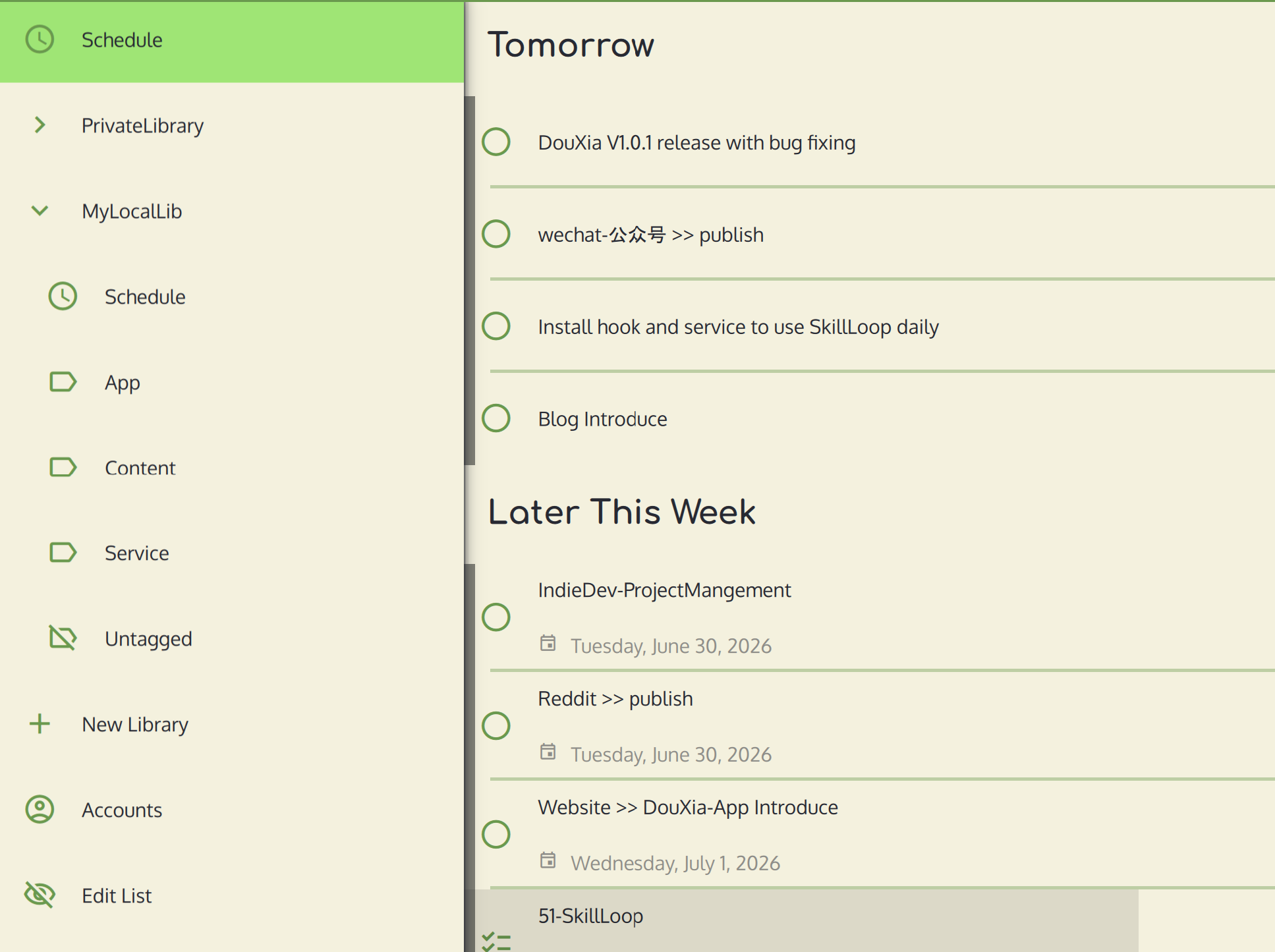
OpenTodoList — the task app that treats my data like files
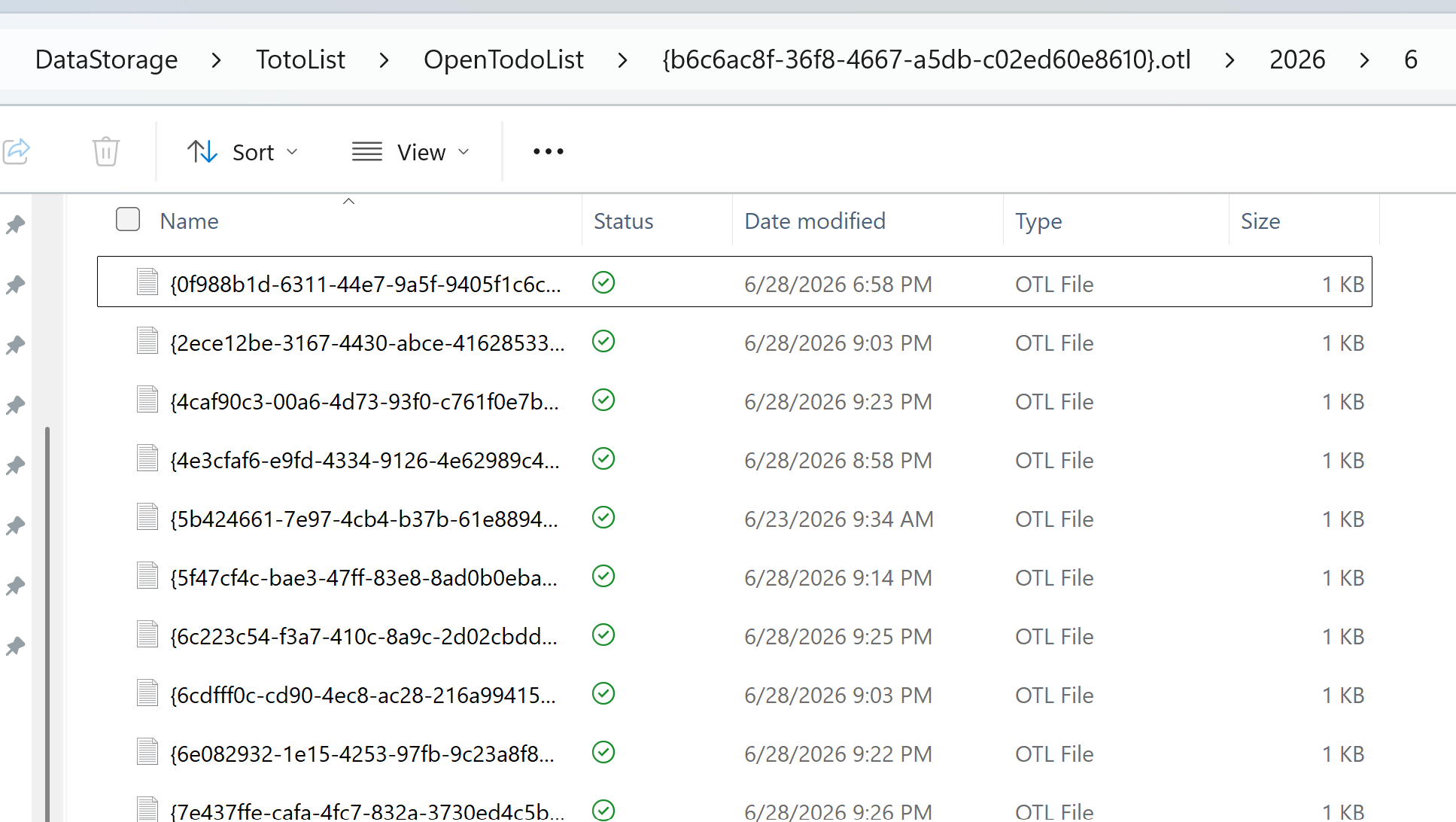
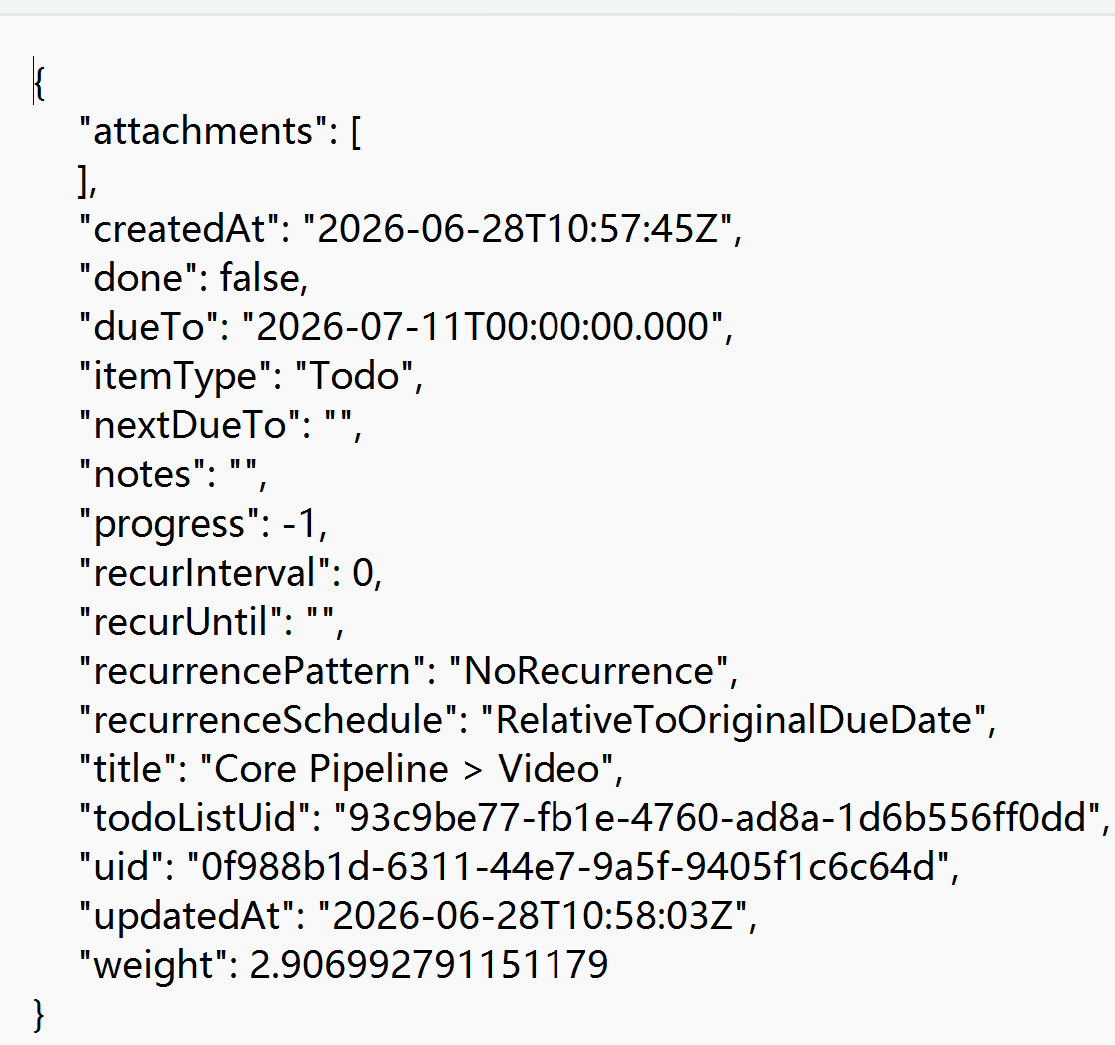
OpenTodoList is a GPL-licensed, cross-platform todo application that nobody in the Productivity Twitter sphere talks about, and that’s a shame. For my constraints it beat every popular option for one reason: tasks are stored as structured JSON files on disk. Not SQLite. Not a proprietary blob. Files.
This sounds like a boring implementation detail until you think through the implications:
- My backup strategy is
tar czf tasks-backup-$(date +%Y%m%d).tar.gz ~/OpenTodoList. Done. - I can
git diffthe folder each evening and see a line-by-line record of which tasks were edited, not just a cloud dashboard telling me “you were productive today!” - I can write a 20-line Python script that counts completed tasks per project label, calculates a velocity, and appends a line to my weekly retro Markdown file automatically.
For engineers, plain-file storage isn’t a “feature” the way UI smoothness is. It’s an escape hatch from vendor lock-in that also enables unlimited automation. That is worth paying for, even though this app is free.
Syncthing — P2P file sync with no server and no subscription
Syncthing has been my favorite self-hosted workhorse for about five years. It’s a peer-to-peer file sync engine, meaning my MacBook, Windows PC, and NAS all talk to each other directly — no data ever passes through a third-party cloud. Each machine stores a full copy of every shared file, so any one device dying doesn’t lose a byte.
I just added my OpenTodoList directory as a new Syncthing share across the three desktop-class machines. Done. Discovery works automatically on a trusted LAN; I configured my NAS as the sole “Introducer” node so adding a new laptop later is a one-step operation.
WebDAV via 坚果云 (JianguoCloud) — the pragmatic phone on-ramp
I genuinely tried running Syncthing directly on Android first. It works — in the same sense that towing a trailer with a sedan works. Modern Android kills background P2P processes aggressively to save battery; every handoff between 4G and home WiFi required a re-discovery delay; and my battery life dropped by 10–15% on heavy days. For the pattern “pull phone out, enter one task, put it away,” WebDAV is simply the correct protocol. Single HTTPS request, no keepalive, works over every network on the planet.
I picked 坚果云 because they’re a Chinese domestic cloud provider (sub-50 ms latency from where I live), have a solid, decade-old WebDAV implementation, and crucially: support app-specific passwords so I never expose my account master credential to a third-party client app.
You don’t have to use the same provider. Any standards-compliant WebDAV server will plug into this architecture exactly the same way — a self-hosted one, Nextcloud’s built-in WebDAV endpoint, whatever you already trust.
The architecture: one always-on bridge, two sync protocols, one unified dataset
The split between “desktop runs Syncthing” and “phone talks WebDAV” is intentional and deliberate. But how do they share the same files?
The trick is so unglamorous it feels like cheating: pick one machine that’s always on, let it participate on both sides.
My NAS has one foot in the Syncthing cluster (shared folder on its local ZFS pool) and the other foot in WebDAV-land (the 坚果云 WebDAV endpoint mounted as a local directory via davfs2). Then every 10 minutes, cron runs the world’s dumbest integration: rsync twice, once in each direction, with conflicted copies saved to dated backup directories instead of being silently overwritten.
  MacBook Pro ──┐
  Windows PC ───┼── Syncthing P2P cluster (3 full copies)
  NAS 24/7 ─────┘        │
                         │  (NAS = the bridge node)
                         ├ rsync ─▶ WebDAV mount ─▶ 云端 ─── Android phone
                         ◀─ rsync ─ (bidirectional sync with conflict backups)
The actual bridge script, copy-pasteable
#!/usr/bin/env bash
# /root/scripts/sync-todo-bridge.sh
# Cron: */10 * * * * /root/scripts/sync-todo-bridge.sh

SRC_SYNCTHING="/tank/syncthing-share/OpenTodoList"
DST_WEBDAV="/mnt/jianguoyun-webdav/OpenTodoList"
BACKUP_ROOT="/tank/sync-conflicts/OpenTodoList"
STAMP="$(date +%Y%m%d-%H%M%S)"

# Direction 1 — desktop cluster → phone cloud
rsync -av --delete \
  --backup --backup-dir="${BACKUP_ROOT}/syncthing-side/${STAMP}" \
  "${SRC_SYNCTHING}/"  "${DST_WEBDAV}/"

# Direction 2 — phone cloud → desktop cluster
rsync -av --delete \
  --backup --backup-dir="${BACKUP_ROOT}/webdav-side/${STAMP}" \
  "${DST_WEBDAV}/"  "${SRC_SYNCTHING}/"

# Housekeeping: conflicted copies live 30 days then get cleaned
find "${BACKUP_ROOT}" -type f -mtime +30 -delete
If consistency semantics matter more to you than CPU cost, swap
rsyncfor Unison. Its bidirectional sync algorithm is first-class instead of approximated. For a todo list touched by one human every 10 minutes,rsynctwice with backups is already overkill.
The three setup mistakes that actually cost me time
Writeups that say “everything worked on the first try!” are lying. Here’s what broke for me and exactly how I fixed it.
Mistake 1 — my Windows PC was on the router’s Guest VLAN. Syncthing broadcast discovery couldn’t see the NAS or MacBook, files sat unsynced for 6 hours before I noticed. Two fixes, either works: move the PC to the trusted VLAN, OR (better, if you travel) manually type each peer’s static tcp://IP:22000 address into Syncthing’s “Remote device → Edit → Advanced → Addresses” and disable discovery entirely.
Mistake 2 — I ran rsync without --backup-dir on day one. On Wednesday afternoon I accidentally emptied the WebDAV mount during a mount -a refresh. Ten minutes later cron ran, and the --delete flag helpfully cleared my entire Syncthing copy too. Four hours of small edits gone. Lesson learned the hard way: any destructive sync between two folders must write its deleted/overwritten items into a timestamped safe directory that I can manually inspect.
Mistake 3 — I tried using my 坚果云 master password for WebDAV auth. The error message is a generic 403, which looks like “this service doesn’t work.” It took me 40 minutes of debugging certificates and TLS versions before I re-read the help page: WebDAV requires an app-specific password generated in the security console, never your login password. Obvious in hindsight.
One month later: a measurable difference
None of this engineering would matter if the outcome wasn’t visible. So I measured, using a small Python script against the completed JSON files in my task directory:
| Metric | 14 days before the system | 14 days after | Change |
|---|---|---|---|
| Sit-down → first push of the day | 14.7 min | 42 seconds | −95% |
| Curiosity detours (mid-day, unplanned) | 3.2 / day | 1.3 / day | −59% |
| Weekend research items completed | 4 of 17 scheduled | 11 of 16 scheduled | +181% |
| Confidence in weekly retro (“I know what I shipped”) | 0/2 truthful | 2/2 truthful | qualitative win |
The line item that surprised me most was the weekend research bump. By taking “interesting but not today” questions and recording them explicitly as low-priority weekend research tasks instead of letting them hijack my Tuesday morning, I actually got to them. Not “some day.” Saturday.
If you’ve ever felt “busy for no reason” at the end of a workday, you know the feeling I’m describing. It is gone. That vague, unsatisfied sense that you ran all day and went nowhere? Replaced by a 10-second glance at my completed list before closing the laptop.
What’s next, and what I’d change if I started over
The next obvious move is to reuse this exact sync topology for my Obsidian vault (daily notes, project docs, design scratch) and my plain-Markdown journal files. Both are “structured text on disk” problems — same OpenTodoList shape, so the Syncthing+WebDAV bridge pattern is drop-in. No new software to learn, no new users to add.
If I could re-do one thing from the first weekend: I would have built the conflict directory + retention policy on day one, not after the four-task scare. You don’t appreciate destructive sync until it eats your data. Add the safety nets first.
The bigger picture: self-discipline via feedback visibility
The most underrated productivity lever for self-managed knowledge workers is feedback visibility. You can’t improve what you can’t see. Tools that aggregate everything into a clean cloud dashboard, then show you “productivity scores” and animated confetti are fun — but they hide the raw data that you could be analyzing for yourself.
You don’t need a $20/mo AI productivity coach. You need something light, yours, always within reach, and willing to show you exactly what you did and didn’t do this week.
If any part of this resonated — if you’ve also stared at a blank evening commit log wondering where the day went — try the simplest possible first step: install any plain-file todo app tonight, and write down three things you will do tomorrow. Don’t set up the bridge. Don’t buy a NAS. Don’t write a script. Just that one small act of writing things down outside your own head. It will already change more than you expect.
This post is part of the Indie Dev Solo Founder Journal series. Previous instalments covered indie revenue modelling and bootstrapped cashflow; the next instalment benchmarks three AI-assisted dev toolchains head-to-head. Subscribe via RSS so you don’t miss it.
Share your own cross-device todo system? Drop it below, I collect every setup. Follow the series via RSS, next instalment is the AI toolchain benchmark.